> ## Documentation Index
> Fetch the complete documentation index at: https://developers.momogood.com/llms.txt
> Use this file to discover all available pages before exploring further.
# Sending messages
> Use the Tatango Transactional Message activity in a Journey Builder journey
## Build the journey
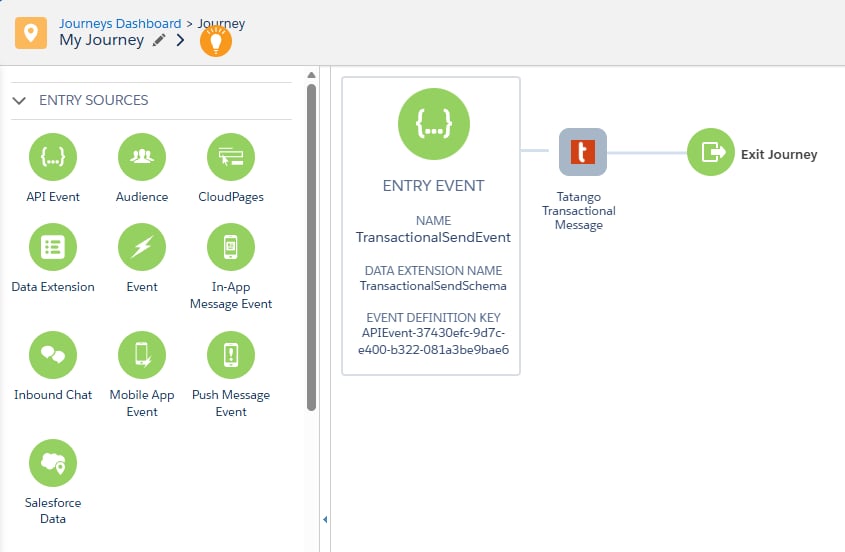
Create a journey whose entry source is backed by a data extension; a **Data Extension** entry source and an **API Event** both work. The entry data extension must contain a phone number column and a subscriber key column; beyond that, its shape is up to you: the activity reads whichever columns you select, and every column is available as a merge tag.
Drag the **Tatango Transactional Message** activity from the Messages section of the palette onto the canvas, then open it to configure.
 ## Configure the activity
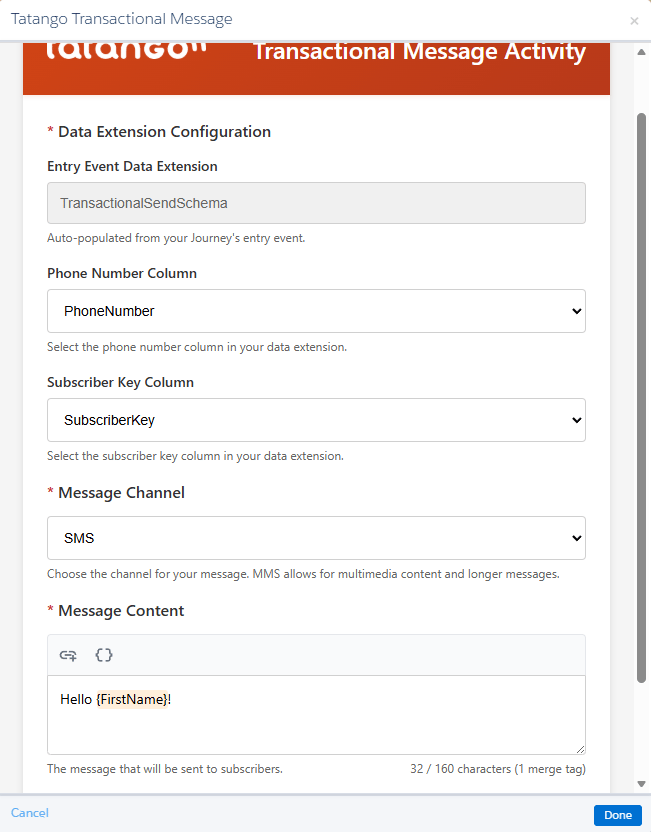 | Field | Description |
| -------------------------- | ----------------------------------------------------------------------------------------------- |
| Entry Event Data Extension | Auto-populated from the journey's entry event; read-only. |
| Phone Number Column | The entry data extension column holding the recipient's phone number. |
| Subscriber Key Column | The entry data extension column holding the contact's subscriber key, recorded with every send. |
| Message Channel | SMS or MMS. MMS allows multimedia content and longer messages. |
| Message Content | The message body: up to 160 characters for SMS or 3,500 for MMS. |
Selecting **MMS** adds three fields:
| Field | Description |
| -------------- | ------------------------------------------------------------------------------------------------------------------------ |
| Subject Line | The MMS subject, up to 40 characters. |
| Attachment URL | A publicly accessible URL for the attachment: JPEG, PNG, or WebP images (1 MB), GIFs (0.6 MB), or MP4/MPEG video (2 MB). |
| SMS Fallback | An SMS message, up to 160 characters, sent to recipients whose devices can't receive the MMS message. |
Each activity instance carries its own configuration, so a journey can contain several Tatango Transactional Message activities with different content, such as one message per path of a decision split or a follow-up later in the journey.
## Send a test message
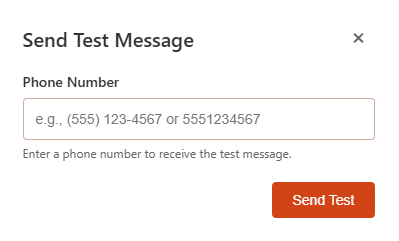
Click **Send Test Message** in the activity to deliver the configured message to a phone number you enter, before the journey goes live.
| Field | Description |
| -------------------------- | ----------------------------------------------------------------------------------------------- |
| Entry Event Data Extension | Auto-populated from the journey's entry event; read-only. |
| Phone Number Column | The entry data extension column holding the recipient's phone number. |
| Subscriber Key Column | The entry data extension column holding the contact's subscriber key, recorded with every send. |
| Message Channel | SMS or MMS. MMS allows multimedia content and longer messages. |
| Message Content | The message body: up to 160 characters for SMS or 3,500 for MMS. |
Selecting **MMS** adds three fields:
| Field | Description |
| -------------- | ------------------------------------------------------------------------------------------------------------------------ |
| Subject Line | The MMS subject, up to 40 characters. |
| Attachment URL | A publicly accessible URL for the attachment: JPEG, PNG, or WebP images (1 MB), GIFs (0.6 MB), or MP4/MPEG video (2 MB). |
| SMS Fallback | An SMS message, up to 160 characters, sent to recipients whose devices can't receive the MMS message. |
Each activity instance carries its own configuration, so a journey can contain several Tatango Transactional Message activities with different content, such as one message per path of a decision split or a follow-up later in the journey.
## Send a test message
Click **Send Test Message** in the activity to deliver the configured message to a phone number you enter, before the journey goes live.
 Test sends are recorded in the `tatango_messages` data extension with `TEST MESSAGE` as their journey and activity IDs, so they are easy to exclude from reporting. The [example report query](/messaging/sfmc/reporting) shows you how to do that.
## Activate
Click **Done** to validate and save the activity configuration, then **Activate** the journey and follow the prompts. Once activation succeeds, contacts entering the journey receive messages.
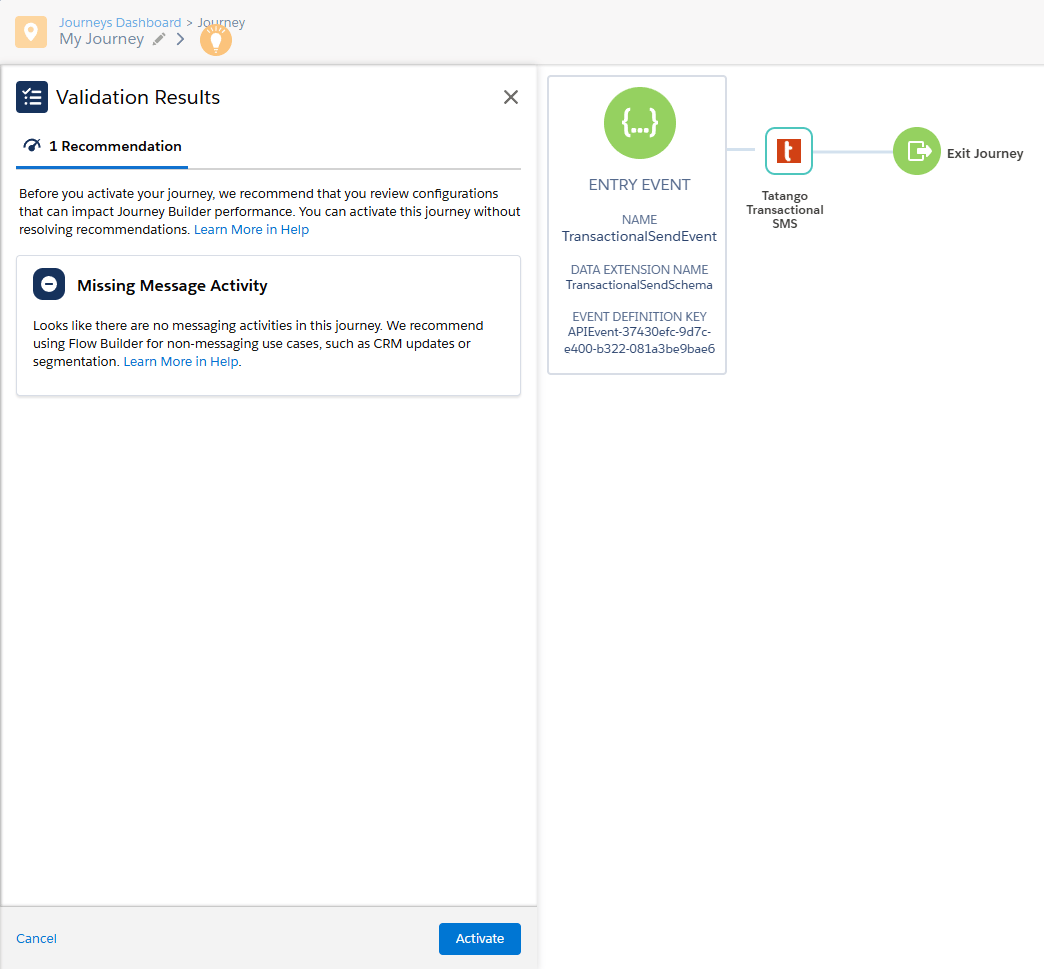
Journey Builder's validation may show a "Missing Message Activity" recommendation because it doesn't recognize custom activities as messaging activities. It's safe to ignore and doesn't block activation.
Test sends are recorded in the `tatango_messages` data extension with `TEST MESSAGE` as their journey and activity IDs, so they are easy to exclude from reporting. The [example report query](/messaging/sfmc/reporting) shows you how to do that.
## Activate
Click **Done** to validate and save the activity configuration, then **Activate** the journey and follow the prompts. Once activation succeeds, contacts entering the journey receive messages.
Journey Builder's validation may show a "Missing Message Activity" recommendation because it doesn't recognize custom activities as messaging activities. It's safe to ignore and doesn't block activation.
 ## Compliance is automatic
Before every send, the activity checks the contact against the `tatango_subscribers` data extension:
* Contacts who opted out (for example, by replying STOP to a previous message) are skipped.
* Contacts whose numbers were cleaned because they can't receive text messages are skipped.
Skipped sends are recorded in `tatango_messages` with a send status of `skipped` and a skip reason, so your reporting still sees the full picture. See the [data extensions](/messaging/sfmc/data-extensions) page for how opt-outs and cleans are captured.
## Compliance is automatic
Before every send, the activity checks the contact against the `tatango_subscribers` data extension:
* Contacts who opted out (for example, by replying STOP to a previous message) are skipped.
* Contacts whose numbers were cleaned because they can't receive text messages are skipped.
Skipped sends are recorded in `tatango_messages` with a send status of `skipped` and a skip reason, so your reporting still sees the full picture. See the [data extensions](/messaging/sfmc/data-extensions) page for how opt-outs and cleans are captured.