

Need to manage lists, subscribers, custom fields, webhooks, or scheduled broadcasts? Use the momoGood Messaging API v2 — the platform management API for momoGood Messaging.
Base URL
The momoGood Messaging API v3 is built on REST principles. We enforce HTTPS in every request to improve data security, integrity, and privacy. The API does not support HTTP. All requests contain the following base URL:Authentication
To authenticate you need to add thex-api-key header populated with your momoGood-provided API key shown in the GIF below.
API Key Creation
You can create an API key by logging into the momoGood Messaging app and navigating to My Account -> API -> Create API Key.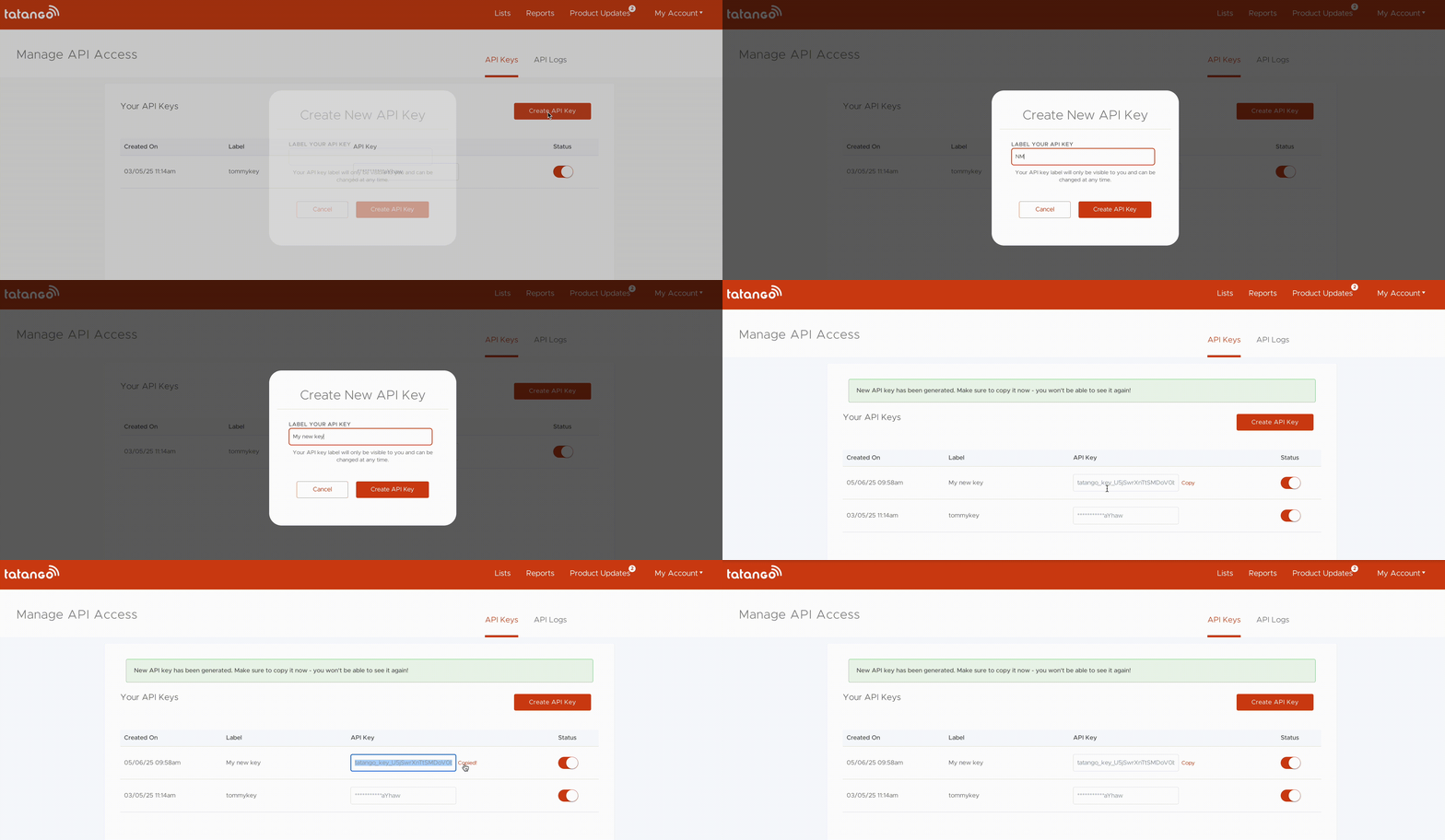
Response Codes
The momoGood Messaging API v3 uses standard HTTP codes to indicate the success or failure of your requests. In general, 2xx HTTP codes correspond to success, 4xx codes are for user-related failures, and 5xx codes are for infrastructure issues.
Specific error information is available for each request. This is shown on the request’s page. See the “response” sub-section at the bottom of the page for an example. Then, click the drop down to see the specific error response examples.